Makerspaces: How to make learning collaborative
Introduction
This project began as a collaborative simulation in INFO 282: Seminar in Library Management, where my team and I were tasked with designing a full makerspace implementation plan. What started as an exercise in project management quickly became something more meaningful–a chance to thing about how libraries can evolve into spaces of creativity, access, and hands-on learning. Together, we developed a detailed project document outlining everything from timelines and staffing to equipment and community partnerships.
Our collaboration was shaped by a clear division of labor that played to each team member’s strengths. Amber focused on visual design elements, I worked on the budget and risk register, Jennifer kept us organized and on schedule, and Michelle ensured consistency as our final editor. At the same time, we rotated writing responsibilities, and maintained shared ownership of the project.
The document that follows focuses on the logistics of building a makerspace, however this experience pushed me to think more deeply about why these spaces matter. Makerspaces represent a shift in how libraries support their communities. They are expanding beyond books, to places that people can actively create, experiment, and learn by doing.
The project plan below captures our approach to implementation. In the reflection that follows, I step back to consider how this makerspace could be more intentionally designed as a learning environment, focusing on how staff training, user instruction, and collaboration can support meaningful and accessible learning experiences.
Library Innovation: Project Plan
By: Michelle Licon, Mickayla Mcdowell, Amber Rivero, Jennifer Tackett
San Jose State University
INFO 282: Seminar in Library Management
Dr. Sean Gaffney
October 5, 2025
Executive Summary
The Library Innovation Makerspace Project aims to establish a creative, technology-driven space within the library that supports lifelong learning, digital literacy, and community collaboration. By integrating tools such as 3D printers, Cricut machines, and media production equipment, the makerspace will empower patrons to explore design, creativity, and innovation in an inclusive and equitable environment.
The project’s objectives focus on accessibility, skill-building, and engagement. Key goals include installing and testing all equipment within ninety days, ensuring 80% of designated staff complete comprehensive training, hosting at least four public workshops within the first month, and enrolling fifty unique patrons in programs within four months! Long-term success will be evaluated through measurable outcomes such as a 60% equipment utilization rate, four established community partnerships, and an 80% patron satisfaction rate within six months of launch.
The scope of the project includes designing, equipping, and maintaining the makerspace, training staff in safety and technology use, and developing ongoing programming. The makerspace will be integrated within existing library infrastructure, and operated during standard hours with trained staff supervision. Exclusions include large-scale construction, personal device distribution, advanced certification training, or 24/7 access. These boundaries ensure the project remains feasible within available resources while maintaining focus on core community objectives.
The implementation plan follows a sixteen-week structured timeline. It begins with project initiation and planning, followed by design, equipment installation, staff training, and program development. The makerspace will officially launch in Week 13, accompanied by public workshops and active community outreach. Key milestones include the completion of equipment setup, staff certification, and the establishment of partnerships with schools, nonprofits, and local organizations.
The project’s success relies on collaboration among key stakeholders, including city council members, the library advisory committee, Friends of the Library, and local partners. Internally, team roles are distributed to ensure accountability: the Project Coordinator oversees progress and reporting, the Designer manages layout and accessibility, the Equipment and Software Researcher identifies technological needs, and the Library Director and Division Managers provide oversight and stakeholder communication.
Through this structured approach, the Library Innovation Makerspace Project will transform the library into a hub of creativity and learning–bridging the gap between traditional library services and modern technological engagement. By providing access to innovative tools and fostering community connections, the makerspace will position the library as a cornerstone for education, creativity, and collaboration in our digital age.
Project Charter: Library Innovation Management
Project Title & Overview
This project will design, establish, and launch a dedicated makerspace within the library to support creativity, learning, and collaboration. Equipped with emerging technologies such as 3D printers and media production tools, the makerspace will offer hands-on learning experiences that encourage innovation and strengthen community engagement.
Expected Makerspace Tools:
Cricut machine
3D printer
Media software
Media Production Tools:
Camera
Tripod (able to attach camera and cell phones)
Ring light
Green screen
Light box
Microphone (lapel microphones and shotgun microphones)
Video editing software
Business Need and Purpose
The makerspace will broaden the library’s role as a hub for lifelong learning by providing equitable access to tools and resources that many community members may not otherwise be able to afford. It aligns with institutional goals of supporting digital literacy, fostering innovation, and strengthening community partnerships.
Measurable Objectives & Success Criteria
The execution of the Library Innovation Makerspace project will be guided by clearly established and measurable objectives that adhere to the library’s overarching mission of equity in creative opportunities, technological access, and learning opportunities. These objectives can be designated into two timelines: before public access and after access has been granted to the public. These guidelines are to ensure cohesion, timeliness, and overall success of the program.
Prior to public launch of the makerspace:
Makerspace equipment fully installed, tested, and operational within ninety days
80% of preselected staff members complete training for the makerspace (safe usage, patron education, and troubleshooting the equipment)
After the public launch of the makerspace:
Four orientation and instructional workshops provided within the first month of opening (with the option to continue workshops based on workshop attendance and patron demand)
Enroll at least fifty unique patrons into makerspace workshops and programs within the first four months of opening
Makerspace is freely accessible to library patrons for at least twenty hours a week
60% equipment utilization rate within the first six months of opening (measured through reservation and usage logs)
Establish at least four partnerships with area schools, local nonprofits, and/or community groups
Determining success of the implementation of the Library Innovation Makerspace will include the use of both operational criteria and community based criteria.
Operational Criteria:
Reliable functionality of makerspace equipment
Clear and concise user guides displayed within the makerspace
Routine maintenance and supply replenishment plan in place within the first six to eight weeks from opening.
Community-based Criteria:
80% satisfaction rate within the first six months of public access (user surveys and polls)
10 documented patron created projects that demonstrate the diversity of library patrons within the first three months of opening (photographic or video documentation)
Makerspace workshops include introductory projects that incorporate skill assessments, basic competencies, and basic skill demonstrations in makerspace equipment and technologies
Incorporating these guidelines and success criteria will not only help ensure the success of this project but will also encourage early patron engagement and makerspace utilization amongst library patrons.
Major Deliverables
The Makerspace project looks to create an environment that is safe, functional, and welcoming. The space will aim to operate, ensure regular maintenance, and provide staff training and ongoing programming for our community members. This will provide long-term value and engagement with space.
Location and Layout:
Finding the best location in the library for the Makerspace
Redesigning the layout to accommodate any new equipment
Prioritizing the safety of patrons as well as accessibility
Equipment and Maintenance
Monthly check-ins and making sure supplies are restored
Maintaining regular checks on the equipment and software to ensure they are running smoothly
Staff Training and Support
Ensure staff training in our policies, equipment usage, and safety procedures.
Ensure staff members are present during the Makerspace operation
Programming and Engagement
Delivering Programming throughout the year and scheduling events
Promoting the Makerspace to ensure engagement
Providing reliable access to our community partners.
Key Stakeholders & Team Roles
When we look at the key stakeholders who would fund our space, they can range from City Council Members to the Library Advisory Committees. Friends of the Library. To our community partner stakeholders, such as schools or nonprofit partners, the Makerspace would be available for utilization by patrons and community members who come into the library every day. They range from regular patrons who are curious about the space to artists and professional community members who need to utilize the equipment or software.
In addition to a dedicated team, we will work together to ensure that our goals for the space are met for our stakeholders.
Key Stakeholders:
City Council Members would approve funds.
The Library Advisory Committee would approve the fund allocation.
Friends of the Library could provide support and funding throughout the year.
Community Partners utilize the space.
Patrons and community members who use the space and equipment.
Team Roles:
Project Coordinator who will oversee usage, manage timelines, communicate needs, and gather data.
The designer will draft up layout plans and redesigns.
The Equipment and Software Researcher will identify and gather information on the necessary equipment and software.
The Library Director and Division Managers would lead our discussion and present plans to stakeholders.
Summary Timeline or Milestones
Week 1: Location scouting
Week 2: Redesign planning for the makerspace space.
Week 3–4: Equipment ordered and installation begins.
Week 5-6: Finish installation
Week 7: Testing equipment
Week 8-10: Staff training completed; at least 80% of preselected staff certified in safety and equipment usage.
Week 11: Develop workshops for launch
Week 12: Began reaching out to potential community partners on partnering with the makerspace
Week 13: LAUNCH!
Month 1 of Launch: Four orientation and instructional workshops offered to the community.
Month 1–2: Established at least four partnerships with local schools, nonprofits, or community groups.
Month 3-4: Begin usage tracking, satisfaction surveys, and documentation of at least ten patron-created projects.
Ongoing: Regular programming scheduled, monthly equipment/supplies check, and usage reports.
Key Assumptions and Constraints
The successful implementation and maintenance of this makerspace is founded upon several key assumptions and constraints.
Assumptions:
There is sufficient funding for the purchase, installation, and maintenance of the makerspace equipment and technology
Ongoing funding will be available to purchase the necessary supplies and replacements for the ongoing utilization of the makerspace
Designated staff members will have the time and resources required for both the initial training and the ongoing patron assistance
There is strong community interest and demand for the makerspace and related services
All makerspace equipment and technology will be delivered as scheduled, installed in a timely manner, and functions reliably
Local schools, nonprofits, and community groups are available and receptive to makerspace resources and services
Library’s existing infrastructure (electrical capacity, internet availability, and physical space) will be able to support the existence and ongoing use of this makerspace
Constraints:
Existing budget and staffing resources will need careful consideration and prioritization
The available physical space will restrict the scale and quantity of technology and equipment
The hours and operation of the makerspace must coincide with staffing consideration and the library’s hours of operation
Procurement of consumable supplies (i.e. 3D printing filament, Cricut cutting materials, etc.) is dependent upon the library’s budget
Library funding cycles limit the ability to upgrade or replace makerspace technology
Project Approval Process
The approval process begins at the project team level. The Project Coordinator will compile progress reports, equipment needs, and stakeholder input, while the Designer will provide layout drafts and technical requirements for the makerspace. Together, they will prepare the project proposal, and submit it to the Library Director and Division Managers for review.
Once vetted by library leadership, the proposal will move to the Library Advisory Committee, which must approve the allocation of space and resources. If budgetary adjustments or city funds are required, the City Council will then provide final approval. The Friends of the Library group may also be consulted for supplemental support.
This chain of approval ensures that the makerspace has both internal alignment and external accountability before launch.
Scope Statement
Project Justification
The purpose of the library makerspace is to expand the library’s role as a hub for collaboration, creativity, and lifelong learning. A dedicated makerspace will support digital literacy and STEAM/STEM education, while fostering collaboration throughout the community we serve.
By offering tools such as 3D printers, multimedia production equipment, and electronic cutting machines, the makerspace will provide access for all to resources that many members of our community cannot afford on their own. The makerspace initiative directly aligns with the library’s mission to support educational opportunities and encourage innovation.
Community partnerships with schools, local businesses and civic organizations will also be strengthened through this makerspace, which will increase the library’s reputation as a catalyst for learning and economic growth. With the offering of structured programs and workshops, as well as open access sessions, the makerspace will inspire creativity.
Deliverables
Redesigning, and accessible space for the Makerspace project within the library, not only will support creativity, learning, and community engagement. The outcome for the project is to equip and maintain the area with tools like a Cricut and 3D printer. As well as continuing restocks when supplies are low, and updating our software to smooth-run. Staff also be trained in any safety procedures as well how equipment is used. Commit to at least one staff member present during open hours to support patrons. Delivering ongoing programming and events including promoting the space to encourage long-term use.
Project Exclusions
Exclusions define the boundaries of our project by clarifying what is not included in the makerspace plan. They help keep the scope realistic and prevent misunderstandings about what the team will deliver. For this project, exclusions outline limits such as what resources the makerspace will not provide, what services fall outside staff responsibilities, and which activities remain beyond the library’s capacity.
The makerspace project will not include construction of new library buildings or major structural renovations. Any renovations made will be limited only to interior layout adjustments.
The project will not provide personal devices (laptops, tablets, or smartphones) to patrons. Patrons are expected to bring their own devices when needed. Additionally, they will be able to reserve our in-library computers and laptops.
The makerspace will not offer unrestricted 24/7 access. Access will be limited to library operating hours and scheduled staff availability.
The project does not cover advanced or specialized training beyond introductory workshops (e.g., professional certification in media production or advanced 3D modeling).
The project does not include external funding or grant-writing efforts; funding is assumed to be provided by the library, Friends of the Library, or local stakeholders already identified.
The project will not provide long-term storage of patron projects or materials
Acceptance Criteria
Objective 1: Ensure makerspace equipment is fully operational before launch.
Acceptance Criteria:
All equipment installed, connected, and powered on without errors
Each piece of equipment successfully completes a standard test run
All user guides are posted and visible next to each piece of equipment
Routine maintenance and supply replenishment schedule is documented and approved within eight weeks of opening
Objective 2: Provide adequate staff training to support patron use.
Acceptance Criteria:
At least 80% of designated staff complete training on safe usage, patron education, and troubleshooting
Staff demonstrate competency in supporting at least three types of makerspace technology
Objective 3: Engage patrons through workshops and programs.
Acceptance Criteria:
Four orientation and instructional workshops delivered within the first month of opening
At least 50 unique patrons enrolled in workshops/programs within the first four months
Workshop materials include clear learning outcomes, step-by-step instructions, and introductory project guides
Objective 4: Ensure broad accessibility and regular utilization of the makerspace.
Acceptance Criteria:
Makerspace is open and freely accessible to patrons at least 20 hours per week with the hours clearly posted.
Achieve a 60% equipment utilization rate within the first six months, measured through reservation and usage logs
Objective 5: Foster community partnerships and collaboration.
Acceptance Criteria:
Establish four partnerships (agreements, documented collaborations, or contracts signed) with local schools, nonprofits, and/or community groups
Documentation (photographic or videographic) of at least ten patron-created projects within the first three months that reflect the diversity of the library community
Objective Six: Measure patron satisfaction and community impact.
Acceptance Criteria:
Patron surveys and polls are distributed, conducted, and collected within the first six months of opening
Achieve at least an 80% patron satisfaction rate within the first six months of opening
At least one quarterly impact report that compiles satisfaction survey and poll data, usage and reservation logs, and the project documentation
Work Breakdown Structure (WBS)
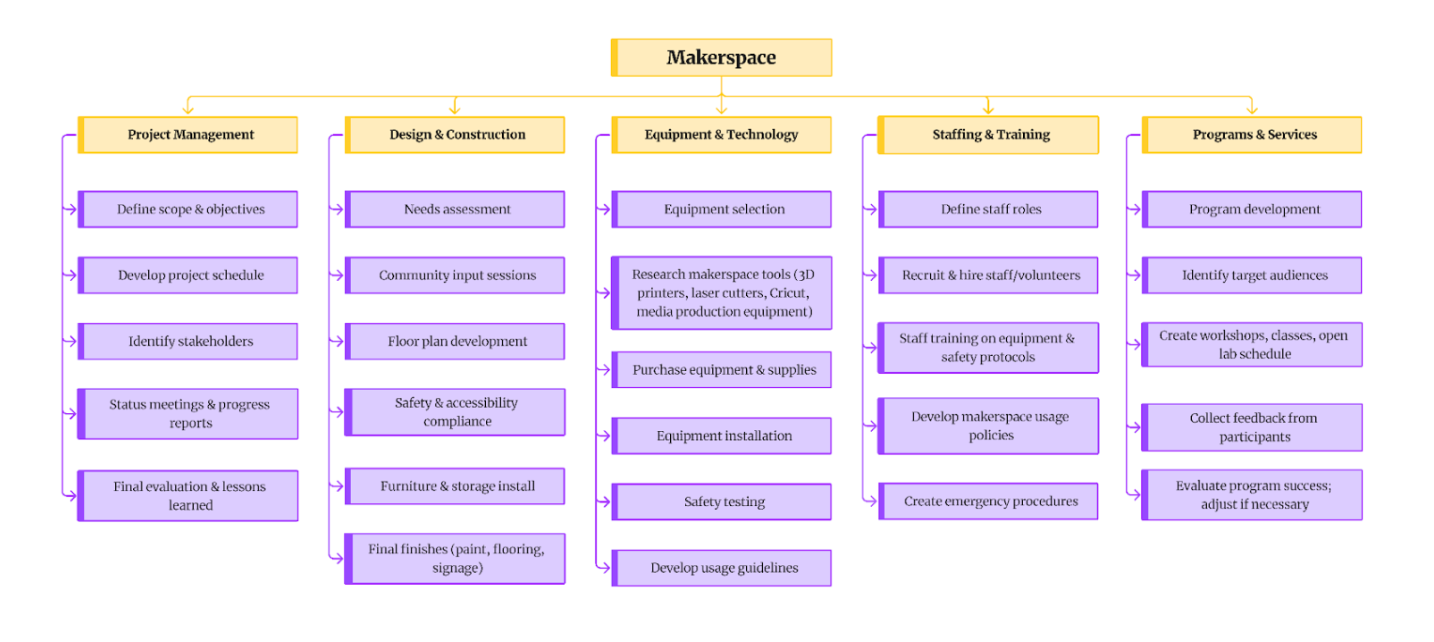
Hierarchical Task Structure
1) Project Management
Define scope & objectives
Develop project schedule
Identify stakeholders
Status meetings & progress reports
Final evaluation & lessons learned
2) Design & Construction
Needs assessment
Community input sessions
Floor plan development
Safety & accessibility compliance
Furniture & storage install
Final finishes (paint, flooring, signage)
3) Equipment & Technology
Equipment selection
Research makerspace tools (3D printers, laser cutters, Cricut, media production equipment)
Purchase equipment & supplies
Equipment installation
Safety testing
Develop usage guidelines
4) Staffing & Training
Define staff roles
Recruit & hire staff/volunteers
Staff training on equipment & safety protocols
Develop makerspace usage policies
Create emergency procedures
5) Programs & Services
Program development
Identify target audiences
Create workshops, classes, open lab schedule
Collect feedback from participants
Evaluate program success; adjust if necessary
WBS with Task IDs and Codes
1.0 Project Management
1.1 : Define scope & objectives
1.2 : Develop project schedule
1.3 : Identify stakeholders
1.4 : Status meetings & progress reports
1.5 : Final evaluation & lessons learned
2.0 Design & Construction
2.1 : Needs assessment
2.2 : Community input sessions
2.3 : Floor plan development
2.4 : Safety & accessibility compliance
2.5 : Furniture & storage install
2.6 : Final finishes (paint, flooring, signage)
3.0 Equipment & Technology
3.1 : Equipment selection
3.2 : Research makerspace tools (3D printers, Cricut, etc.)
3.3 : Purchase equipment & supplies
3.4 : Equipment installation
3.5 : Safety testing
3.6 : Develop usage guidelines
4.0 Staffing & Training
4.1 : Define staff roles
4.2 : Recruit & hire staff/volunteers
4.3 : Staff training on equipment & safety protocols
4.4 : Develop makerspace usage policies
4.5 : Create emergency procedures
5.0 Programs & Services
5.1 : Program development
5.2 : Identify target audiences
5.3 : Create workshops, classes, open lab schedule
5.4 : Collect feedback from participants
5.5 : Evaluate program success; adjust if necessary
Visual Diagram of WBS
Initial Gantt Chart
Task Durations
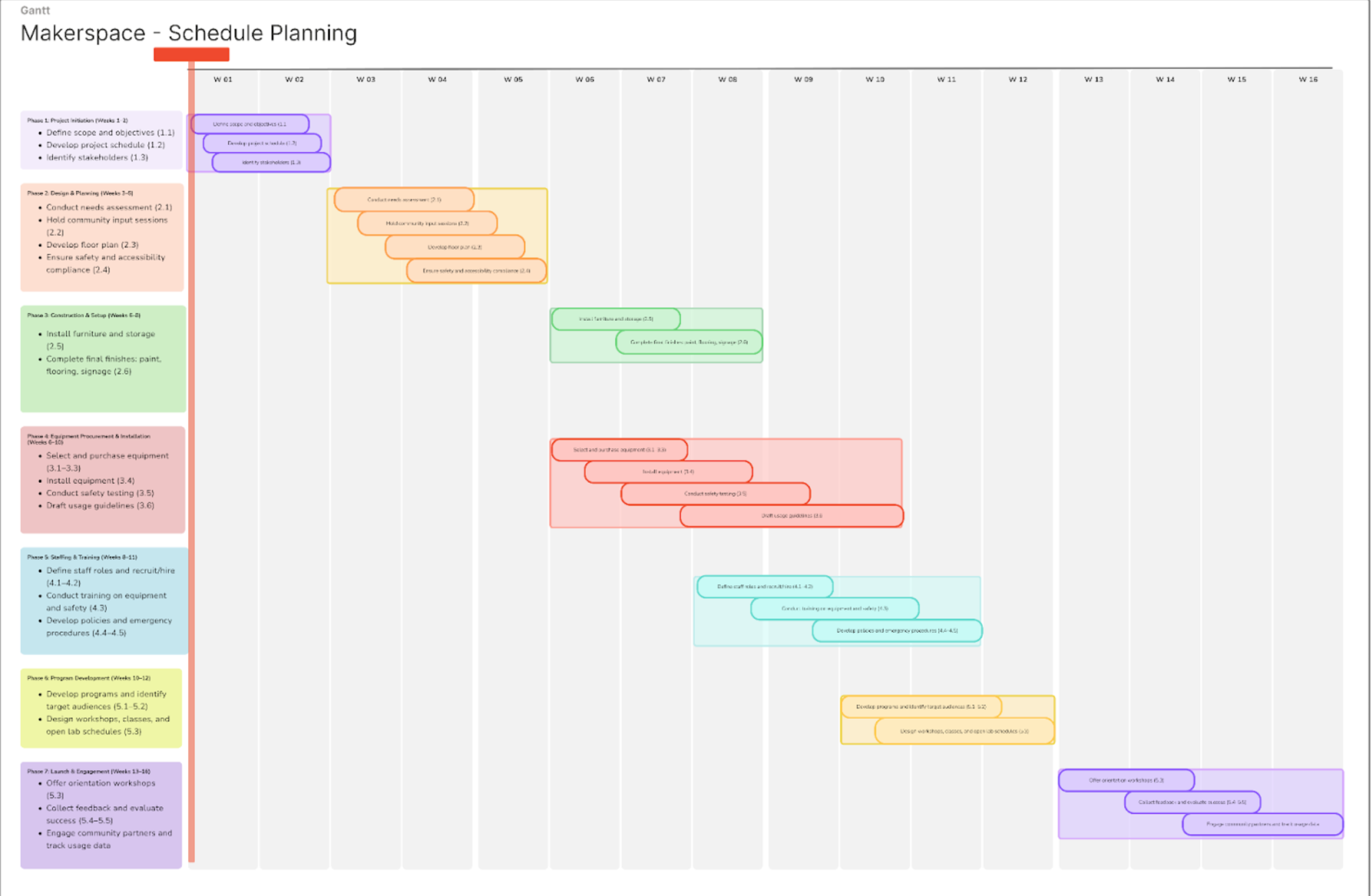
Sequencing Timeline
Phase 1: Project Initiation (Weeks 1–2)
Define scope and objectives (1.1)
Develop project schedule (1.2)
Identify stakeholders (1.3)
Phase 2: Design & Planning (Weeks 3–5)
Conduct needs assessment (2.1)
Hold community input sessions (2.2)
Develop floor plan (2.3)
Ensure safety and accessibility compliance (2.4)
Phase 3: Construction & Setup (Weeks 6–8)
Install furniture and storage (2.5)
Complete final finishes: paint, flooring, signage (2.6)
Phase 4: Equipment Procurement & Installation (Weeks 6–10)
Select and purchase equipment (3.1–3.3)
Install equipment (3.4)
Conduct safety testing (3.5)
Draft usage guidelines (3.6)
Phase 5: Staffing & Training (Weeks 8–11)
Define staff roles and recruit/hire (4.1–4.2)
Conduct training on equipment and safety (4.3)
Develop policies and emergency procedures (4.4–4.5)
Phase 6: Program Development (Weeks 10–12)
Develop programs and identify target audiences (5.1–5.2)
Design workshops, classes, and open lab schedules (5.3)
Phase 7: Launch & Engagement (Weeks 13–16)
Offer orientation workshops (5.3)
Collect feedback and evaluate success (5.4–5.5)
Engage community partners and track usage data (Continuing)
Sequencing
Sequencing lays out the order of our project tasks and shows how each step connects to the next. It helps us see what needs to be finished first, what can happen at the same time, and which pieces depend on each other before moving forward. For our makerspace project, this means making sure the planning and design work is in place before equipment is installed, that staff are trained once tools are ready, and that programs launch only when everything else is prepared.
Dependencies & Parallel Activities
Project Management (1.0) tasks begin first (defining scope, schedule, stakeholders). Status meetings (1.4) occur throughout, and evaluation (1.5) comes at the end.
Design & Construction (2.0) begins after initial scope and stakeholder approval (1.1–1.3). Community input (2.2) and floor plan (2.3) must be completed before furniture and finishes (2.5–2.6).
Equipment & Technology (3.0) runs in parallel with construction but depends on completion of floor plan (2.3) and safety compliance (2.4). Installation (3.4) cannot occur until furniture (2.5) is in place.
Staffing & Training (4.0) begins during late construction but requires some equipment to be installed (3.4) so staff can be trained properly.
Programs & Services (5.0) can begin planning (5.1–5.2) as early as staffing definition (4.1). Actual workshops (5.3) depend on staff training (4.3) and finalized equipment guidelines (3.6).
Gantt Chart Visualization
Major Milestones Summary
Project kickoff
Space construction/renovation
Equipment selection & purchasing
Equipment setup & testing
Pilot programs initiated
Launch of programming
Staff hired & trained
Full makerspace launch
Project closeout & lessons learned
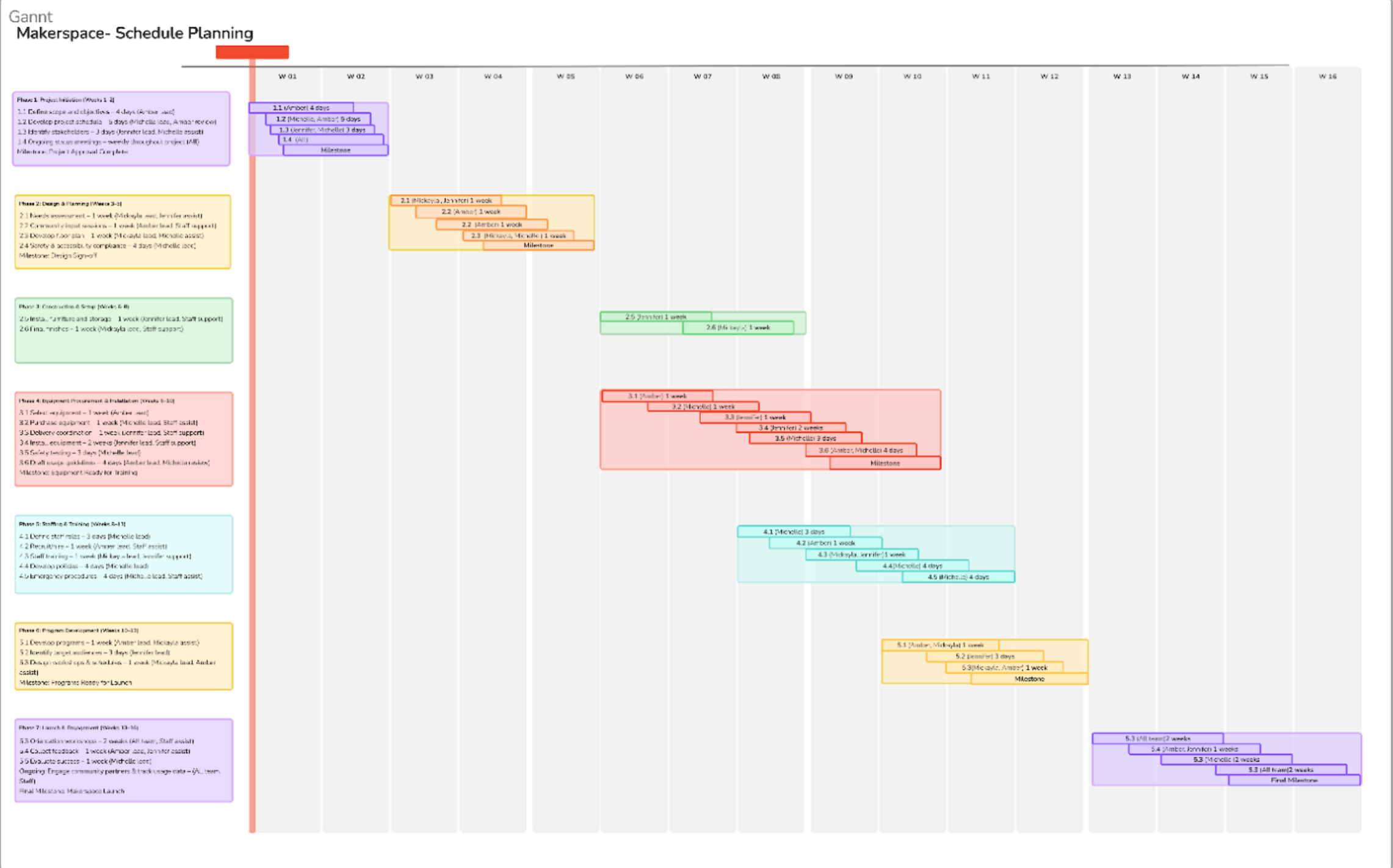
Makerspace Project Schedule Update
Updated Gantt Chart
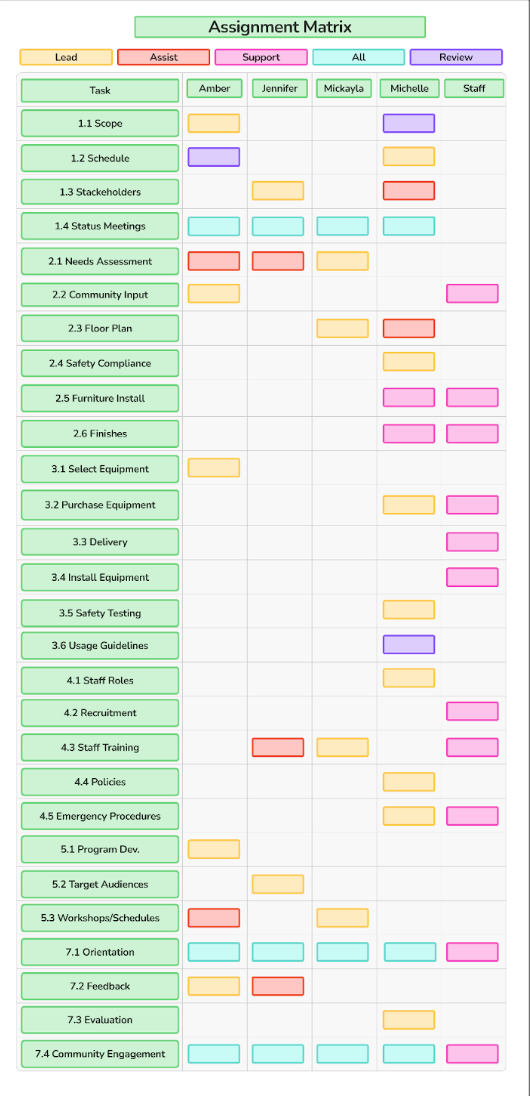
Resource Assignment Matrix
Time Estimation Notes
When we estimated task durations, we looked at the scope and complexity of each activity and tried to stay realistic about how long things would actually take. Smaller planning items, like defining scope or drafting policies, only needed a few days, while bigger tasks such as equipment installation or running orientation workshops were given longer timelines since they involve multiple steps and coordination with staff. We also paid attention to dependencies, making sure milestones like design sign-off or equipment readiness created natural checkpoints before moving into the next phase.
For assumptions, we worked with the idea that each team member would be consistently available to contribute, while staff would mainly support hands-on or event-based tasks. We tried to balance leadership roles across the group so no one person carried too heavy of a load. Michelle did take on more of the compliance and policy-related work, but that made sense with her role. By giving staff support duties instead of leadership roles, we kept workloads manageable and made sure the project stayed realistic with the resources we had. Finally, as none of us have experience with this high-level of project management, we ran our completed timeline through ChatGPT to check if the allotted times were realistic and fairly distributed to all team members.
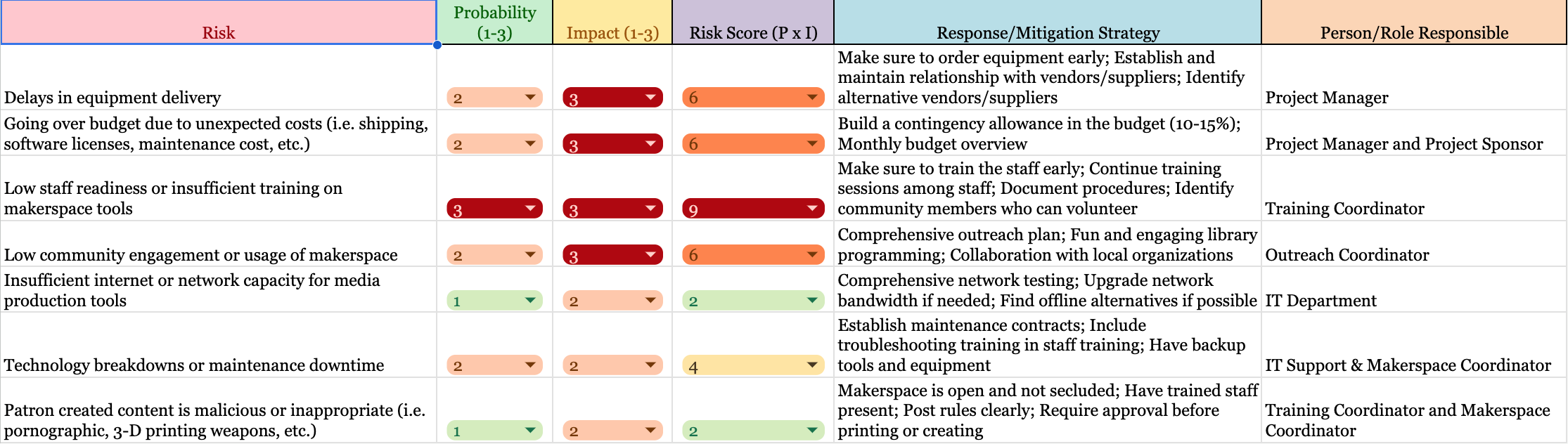
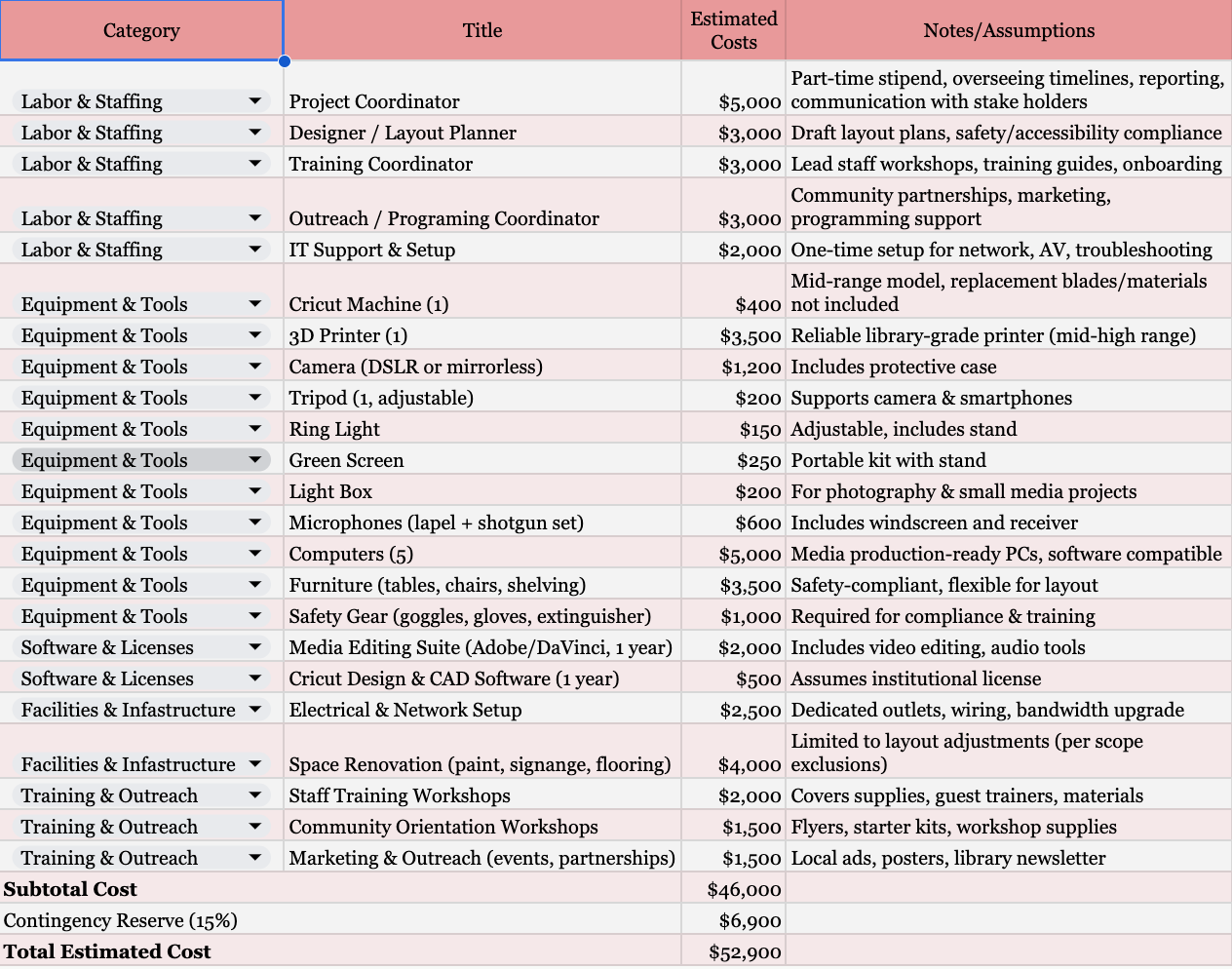
Risk & Budget Assessments
Risk Register & Budget Estimate: Link HERE
Communication Plan
Quality Plan
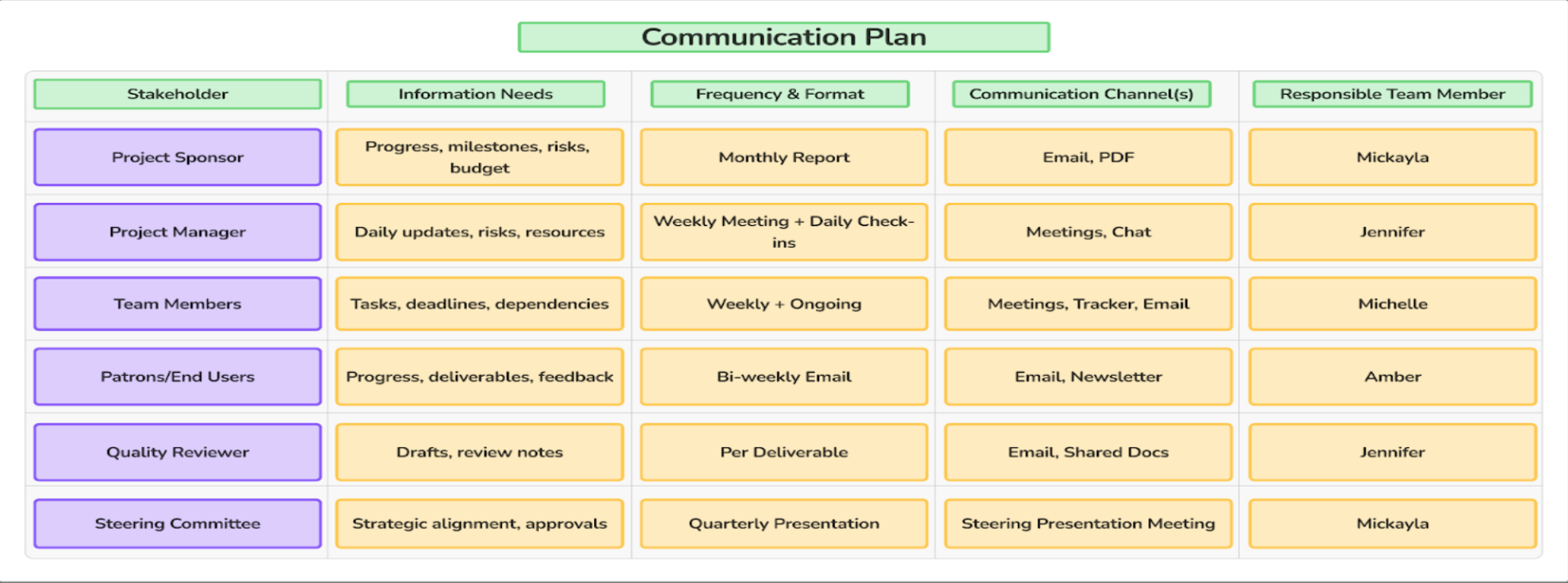
While ensuring high-quality outputs, our team is dedicated to delivering our plan by using structured templates for presentations and reports, while following the library’s style and formatting guides. We consider peer reviews before submitting any work to maintain our vision for the plan throughout the process by sharing documents and tracking any changes, doing our best to remain consistent. Each of our deliverables will be reviewed by Jennifer, our Quality Reviewer, who checks all drafts to ensure we meet our standards before submission. She has weekly meetings along with check-ins with the team. She communicates with the Project Manager to address any risks or resource needs.
Feedback from any of our patrons will be looked at closely biweekly by Amber to patrons via email and newsletters, ensuring communication is clear and consistent to improve on any deliverables, while meeting our quality standards. Monthly reports will be sent by Mickayla to the Project Sponsor and the Steering Committee. She provides final approval for sponsor and committee materials, ensuring they are aligned with our goals. Updates to tasks, deadlines, and any changes will be made by Michelle with the team through meetings, trackers, and email. She supports internal communication and helps maintain workflow across the team, meeting project goals, and fulfilling stakeholder expectations.
References
Gido, J., Clements, J., & Baker, R. (2018). Successful project management (7th ed.). Cengage Learning.
OpenAI. (2025). ChatGPT (version GPT-5) [Large language model]. https://chat.openai.com/chat
Used to draft layout and structure of the overall project management document.
1
Designing a Makerspace as a Learning Environment: A Reflective Analysis
While the Library Innovation Makerspace Project Plan above is framed as a project management document, it also presents a strong foundation for developing a learning-centered environment. Reflecting on this work, I began to consider how the proposed makerspace could move beyond a functional space for tools, and become an intentional site of learning. Rather than focusing solely on implementation, I would approach the makerspace through the lens of instructional design, drawing on key learning theories such as constructivism, cognitive load theory, and active learning to shape both staff training and user engagement.
At its core, a makerspace aligns with constructivist learning theory, which emphasizes that individuals build knowledge through active engagement and experience (Vygotsky, 1978). In this context, learning is not delivered passively, but constructed through interaction with tools, materials, and other learners. The project plan already emphasizes hands-on technologies such as 3D printers and media production tools. However, to fully realize this potential, the makerspace would need to be intentionally designed so that users are actively engaging in experimentation, problem-solving, and reflection.
To support this type of engagement, I would structure staff training as the instructional foundation of the makerspace. Rather than treating training as a procedural requirement, I would design it as a scaffolded learning process informed by cognitive load theory (Sweller, 1988). Cognitive Load Theory suggests that because working memory is limited in capacity, instruction should be carefully structured to avoid overwhelming learners and to support comprehension. Makerspace technologies can be overwhelming for beginners, and without careful structuring, both staff and patrons may experience cognitive overload. To mitigage this, training would be broken into discrete, manageable modules that focus on essential concepts first, followed by gradual increases in complexity.
Staff training would begin with an orientation that establishes the purpose of the makerspace as a learning environment and introduces staff to their role as facilitators of learning. This would be followed by modular instruction on each tool, where content is segmented into key components such as terminology, setup, operation, and troubleshooting. Demonstrations would allow staff to observe complete workflows before attempting them independently, and guided hands-on practice would provide opportunities to apply knowledge with support. Reflection and troubleshooting would be incorporated to help staff process their learning and prepare for real-world challenges. Finally, staff would engage in instructional practice, learning how to explain processes clearly and support novice users. This progression ensures that staff are not only technically competent, but also prepared to guide others effectively.
Buidling on this foundation, user learning experiences would be designed using active learning techniques, which emphasize participation and application rather than passive observation (Bonwell & Eison, 1991). Workshops would be structured around specific, achievable tasks, such as creating a simple 3D-printer object or recording a short media clip. Each session would include a brief introduction, demonstration, guided hands-on activity, and an opportunity for reflection. This approach reduces cognitive load while allowing users to experience immediate success, reinforcing both confidence and engagement.
In addition to formal workshops, the makerspace would support informaiton and self-directed learning through open lab sessions. During these sessions, patrons would apply what they have learned to personal projects, experimenting with tools and materials while receiving support from staff as needed. This environment reflects constructivist principles by allowing learning to build knowledge through exploration and problem-solving. Staff would act as facilitators, offering guidance without removing the learner’s sense of ownership over the process.
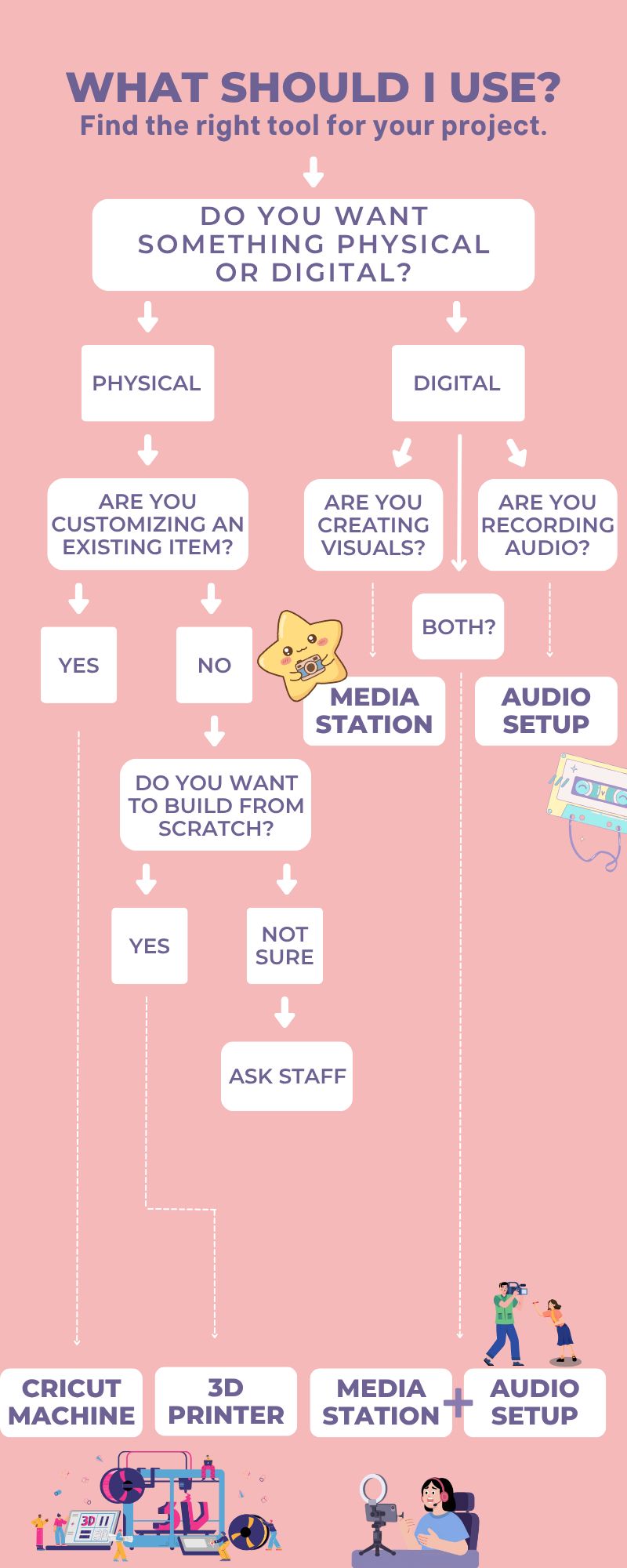
To further support learning, I would develop instructional materials designed to minimize cognitive load and promote accessibility. Clear, concise user guides placed near equipment would provide step-by-step instructions while visual aids and quick reference materials would support different learning preferences. By presenting information in multiple formats, the makerspace can accommodate a diverse range of users and ensure that learning remains accessible and approachable. Below are some examples of infographics that could be displayed in the makerspaces or through QR codes.

Ultimately, reflecting on this project has shifted my understanding of what a makerspace can be. While the original plan successuflly addresses the logistical components of implementation, its greatest potential lies in its ability to support intentional, theory-informed learning. By integrating principles such as constructivism, cognitive load theory, and active learning into the design of staff training and user experiences, the makerspace can function not just as a collection of tools, but as a structured, collaborative and engaging learning environment.
References
Bonwell, C. C., & Eison, J. A. (1991). Active learning: Creating excitement in the classroom (ASHE-ERIC Higher Education Report No. 1).
Gido, J., Clements, J., & Baker, R. (2018). Successful project management (7th ed.). Cengage Learning.
Sweller, J. (1988). Cognitive load during problem solving: Effects on learning. Cognitive Science, 12(2), 257–285.
Vygotsky, L. S. (1978). Mind in society: The development of higher psychological processes. Harvard University Press.
Note: ChatGPT (OpenAI, 2025) was used to assist with formatting and layout of the project management plan. All content, analysis, and final decisions were completed by the authors.
